
If you’ve ever set up web hosting and noticed an option called MySQL Databases in your control panel, you may have wondered what it actually does.
A database is one of the most important parts of many modern websites and applications. It stores information such as user accounts, blog posts, products, orders, comments, and settings so that websites can retrieve and update that information when needed.
In this guide, we’ll explain what is a database, how it works, the main types of databases, and when your website needs one.
What Is a Database?
A database is an organized collection of information stored electronically so that it can be easily added, searched, updated, and managed.
Think of a library. The books are the data, while the catalog helps you find a specific book without searching every shelf. A database works in a similar way. It stores information in an organized structure so applications can quickly find exactly what they need.
For example, an online store might use a database to store:
- Customer accounts
- Product information
- Orders and payments
- Stock quantities
- Customer reviews
Whenever you log in, view an order, or add something to your shopping cart, the website may be reading or updating information in its database.
Database vs. Database Management System (DBMS)
The terms database and MySQL are often used interchangeably, but they are not exactly the same.
- Database: The organized collection of stored information.
- DBMS: The software used to create, read, update, and manage that information.
For example, MySQL, PostgreSQL, MariaDB, and MongoDB are database management systems.
Your website’s code sends requests to the DBMS, and the DBMS handles the actual work of finding or changing the required data.
How Is Data Organized?
Relational databases organize information using tables, similar to spreadsheets.
A table contains:
- Rows: Individual records
- Columns: Categories or fields of information
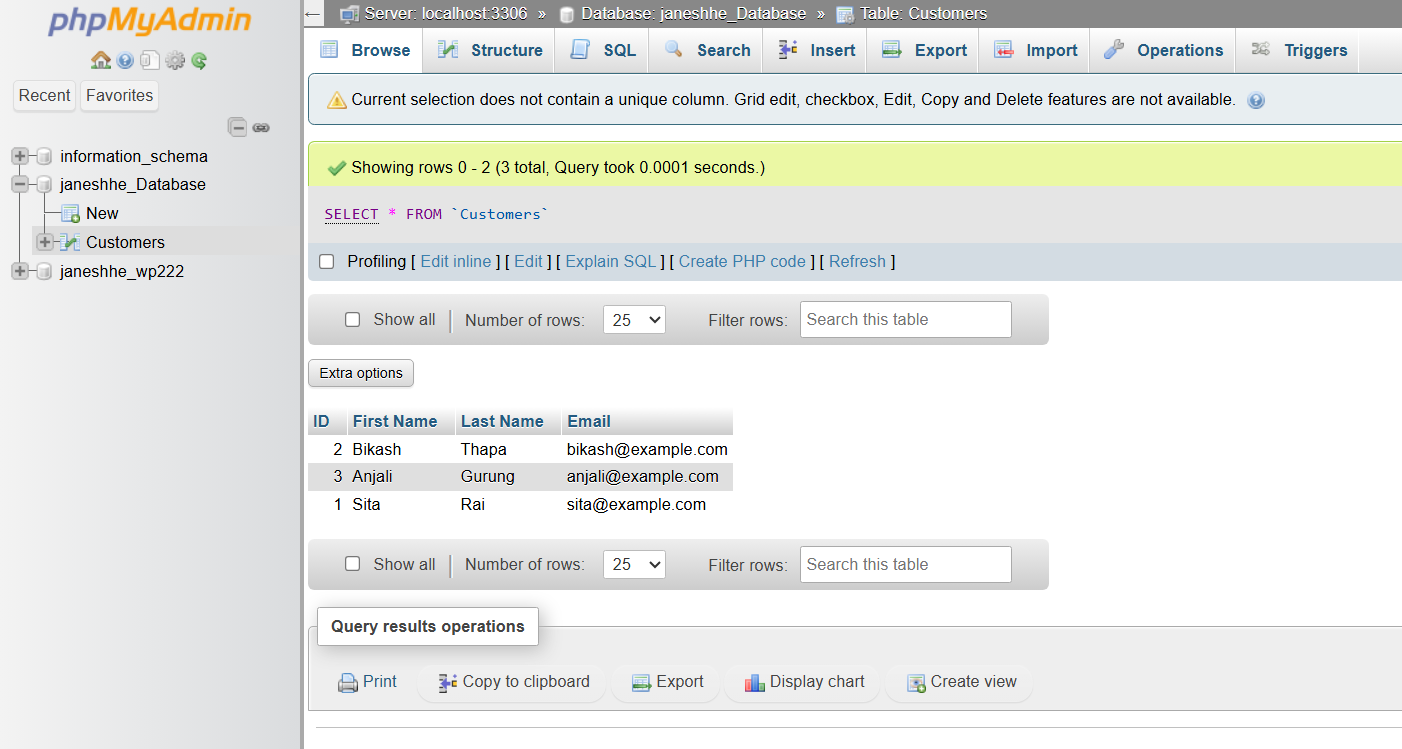
For example, a Customers table might look like this:
| ID | First Name | Last Name | |
|---|---|---|---|
| 1 | Sita | Rai | [email protected] |
| 2 | Bikash | Thapa | [email protected] |
| 3 | Anjali | Gurung | [email protected] |
The ID provides a unique identifier for each customer. This becomes especially useful when different tables need to be connected.
For example, an application might have:
Customers → Orders → Products
Instead of storing a customer’s name and email repeatedly in every order, the Orders table can store the customer’s ID. This reduces duplicate data and keeps related information organized.
SQL vs. NoSQL Databases
Databases are commonly divided into two broad categories: relational (SQL) and non-relational (NoSQL).
| Feature | SQL / Relational | NoSQL / Non-relational |
|---|---|---|
| Structure | Tables with rows and columns | Documents, key-value pairs, or other formats |
| Schema | Usually predefined | More flexible |
| Relationships | Strong support for related data | Usually less relationship-focused |
| Examples | MySQL, PostgreSQL, MariaDB | MongoDB, Redis, Cassandra |
| Common use | Websites, e-commerce, financial systems | Large-scale, flexible, or distributed applications |
Relational Databases
Relational databases store data in structured tables and use SQL (Structured Query Language) to work with that data.
They are commonly used for applications involving clear relationships, such as:
- User accounts
- Orders and invoices
- Inventory
- Content management systems
MySQL and MariaDB are especially common in web hosting environments.
NoSQL Databases
NoSQL databases use formats such as documents or key-value pairs instead of traditional relational tables.
They can be useful when data structures change frequently or when applications need to handle very large amounts of distributed data.
Neither SQL nor NoSQL is suitable for every situation. The right choice depends on the application’s requirements.
Common Database Systems
Here are some database systems you may encounter when developing or hosting websites:
- MySQL: A popular open-source relational database widely used with WordPress and PHP applications.
- MariaDB: An open-source database system developed as a fork of MySQL and commonly available on web hosting platforms.
- PostgreSQL: A powerful relational database often used for complex and data-intensive applications.
- SQLite: A lightweight, file-based database that doesn’t require a separate database server.
- MongoDB: A document-oriented NoSQL database designed for flexible data structures.
How Does a Database Work With a Website?
A database usually works behind the scenes. A simplified process looks like this:
- A visitor opens a webpage.
- The web server receives the request.
- The website’s code, such as PHP, Python, or Node.js, requests information from the database.
- The database management system processes the request.
- The required information is returned to the website.
- The website combines the data with its design and sends the page to the visitor’s browser.
For example, when you open a blog post, the website may request the post’s title, content, author, and other information from the database before displaying the page.
On shared hosting, databases are often managed through tools such as phpMyAdmin, which provides a graphical interface for managing database tables and data.
Database vs. Spreadsheet
A database and spreadsheet both organize information using rows and columns, but they are designed for different purposes.
| Database | Spreadsheet |
|---|---|
| Designed for applications | Designed mainly for manual data management |
| Handles many simultaneous users | Better suited to smaller-scale collaboration |
| Supports complex relationships | Limited relationship management |
| Can handle large datasets efficiently | Performance can decline with very large datasets |
| Applications can query it directly | Usually requires additional integration |
A spreadsheet is often sufficient for a personal list or small dataset. A database becomes more useful when an application needs to store, retrieve, and update data automatically.
Basic Database Security
Databases often contain important information, so security should be considered from the beginning.
Some basic practices include:
- Use a strong, unique database password.
- Create separate database users for different applications and give them only the permissions they need.
- Use prepared statements instead of directly inserting user input into SQL queries to help prevent SQL injection.
- Keep regular backups and make sure those backups can actually be restored.
- Keep your website software and plugins updated.
If you’re using WordPress or another established platform, much of the database interaction is handled by the software. You still need to protect your hosting account, database credentials, and backups.
Do You Need a Database?
Not every website needs a database.
A simple static website containing only HTML, CSS, JavaScript, and files may work without one.
You will generally need a database when your website needs to:
- Allow users to create accounts or log in
- Store blog posts or other dynamic content
- Manage products and orders
- Store comments or reviews
- Remember user preferences
- Run a CMS such as WordPress
If your website is currently simple, you can start without a database and add one later when your requirements grow.
Frequently Asked Questions
Do I need coding knowledge to use a database?
Not necessarily. Tools such as phpMyAdmin allow you to create tables, view data, and perform basic database operations through a graphical interface. Coding is mainly required when you want your website or application to communicate with the database automatically.
Is a database the same as a web server?
No. A web server delivers website files and runs application code, while a database stores and retrieves information used by that application. They are separate components, although they can run on the same physical server.
Can one website use multiple databases?
Yes. An application can use multiple databases when there is a specific need for separating or managing different types of data.
Is data automatically safe because it is stored in a database?
No. Database security depends on factors such as strong credentials, correct permissions, secure application code, software updates, and reliable backups.
In Short
A database is an organized system for storing and managing information so that websites and applications can quickly retrieve and update it.
Database management systems such as MySQL, MariaDB, PostgreSQL, and MongoDB provide the software needed to work with that information.
For most beginners building a WordPress website, blog, online store, or custom web application on hosting, a relational database such as MySQL or MariaDB will be an important part of the setup.