



Whether you are starting a new business, launching a personal blog, or building a website for your organization, you will need a domain name.
Registering a domain name in Nepal is not as complicated as it may seem. Once you understand the process, the entire registration can take less than an hour, and in some cases, your domain may be ready to use within just a few minutes.
In Nepal, you have two main options. You can register a free .com.np domain through the official government registry, or register a popular extension like .com, .net, or .org quickly through any trusted provider.
Follow the steps below and you will have your domain name ready by the end of today.
What Is a Domain Name?
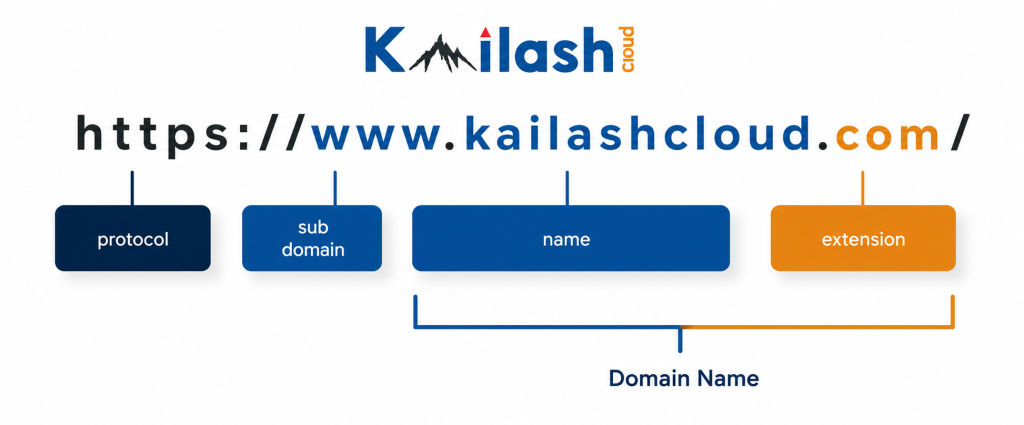
A domain name is the web address people use to access your website. Just like a physical address helps customers find a shop, a domain name helps users find your website online.
For example, kailashcloud.com is a domain name. The part after the dot, such as .com, .np, or .net, is called a domain extension. In Nepal, the most commonly used domain extensions are:
- .com.np : Nepal’s official free domain extension, managed by the national registry
- .com : The most widely used international extension in the world
- .net : Commonly used by technology and internet related businesses
- .org : Primarily used by non profit organizations and institutions
- .info : A general purpose domain extension that is often more affordable than .com
Part 1: How to Register .com.np Domain in Nepal
The .com.np domain is Nepal’s official country-code domain. It is managed by Mercantile Communication Pvt. Ltd. under the .np registry. Registration and renewal are both free , you pay nothing now and nothing later.
There is one important rule to know before you apply: your domain name must match your personal name or your registered business name. The registry will check your documents and reject any name that does not match.
Who Can Register a .com.np Domain?
- Nepali citizens with a valid citizenship certificate, passport, driving licence, or voter’s card
- Registered companies with company registration certificate and PAN or VAT certificate
- NGOs and organizations with registration certificate and Social Welfare Council affiliation letter
- Foreign nationals only if they operate a business registered in Nepal
Domain names are given on a first-come, first-served basis. If someone has already registered your preferred name, you will need to choose a different one.
Documents Required for .com.np Domain Registration
For individuals:
- Citizenship certificate (front and back), or passport, or driving licence, or voter’s card
For businesses:
- Company registration certificate
- PAN or VAT registration certificate
- Authorization letter if someone is applying on behalf of the company
For NGOs and INGOs:
- Organization registration certificate
- Social Welfare Council affiliation certificate
Scan all documents before you start. Files must be in PDF or JPEG format and under 200 KB each. Blurry or cut-off scans are one of the most common reasons applications get delayed. So, take a clear scan and save yourself the wait.
Step-by-Step: .com.np Domain Registration Process
Step 1: Check If Your Domain Name Is Available
Go to register.com.np (Nepal’s official domain registry website). Type your preferred name in the search bar (without the .com.np part) and click Search.
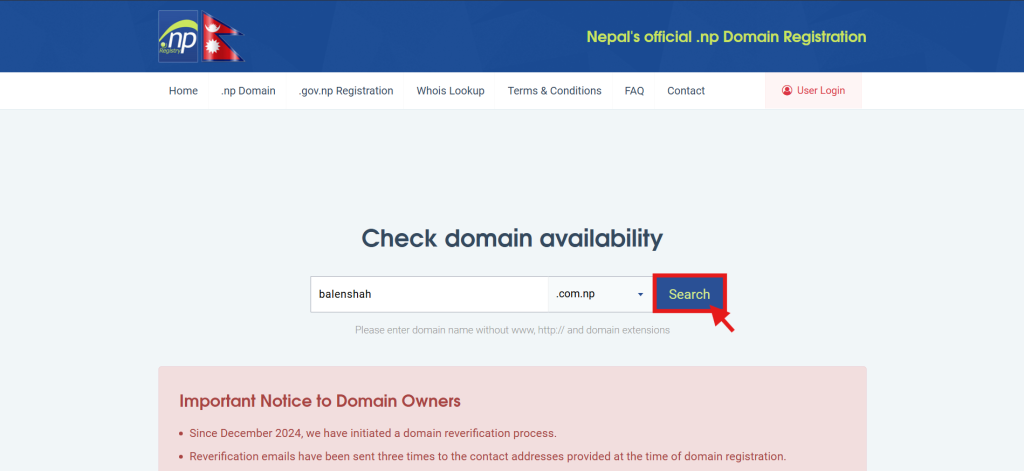
Note: The name must be at least 3 characters, alphanumeric with hyphens allowed (no starting/ending hyphen). It should match your name or business exactly.
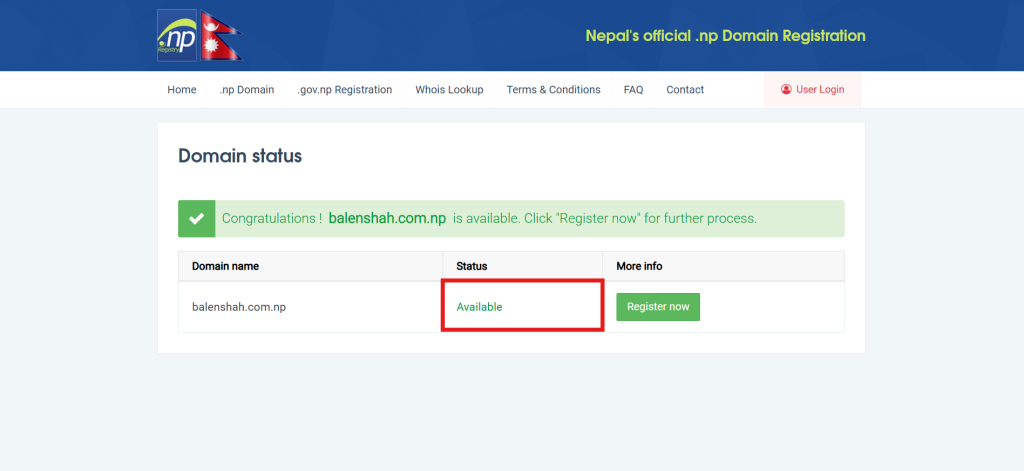
A page will open showing whether the domain name is available. If the name is already taken, try a shorter variation or an abbreviation of your name. Keep it simple, easy to spell, and memorable.
Step 2: Create an Account on register.com.np
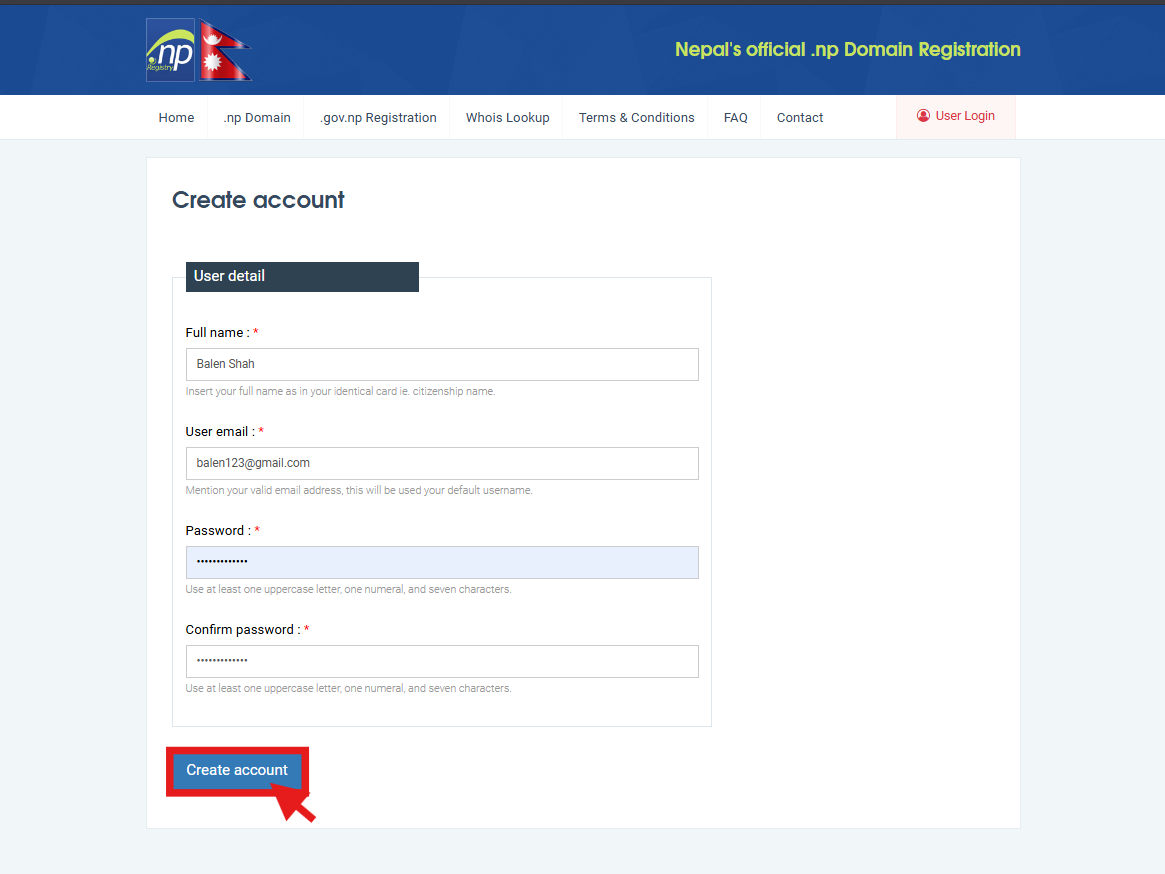
Click “Register Now” or “User Login” on the website, then click “Create User”. A registration form will open. Enter your full name, email address, and a secure password, then click “Create Account.”
After registration, check your email inbox for a confirmation message and click the verification link to activate your account.
Use an email address that you access regularly, as all official communication from the registry including approval notifications and important updates will be sent to this email address.
Step 3: Fill In the Domain Registration Form
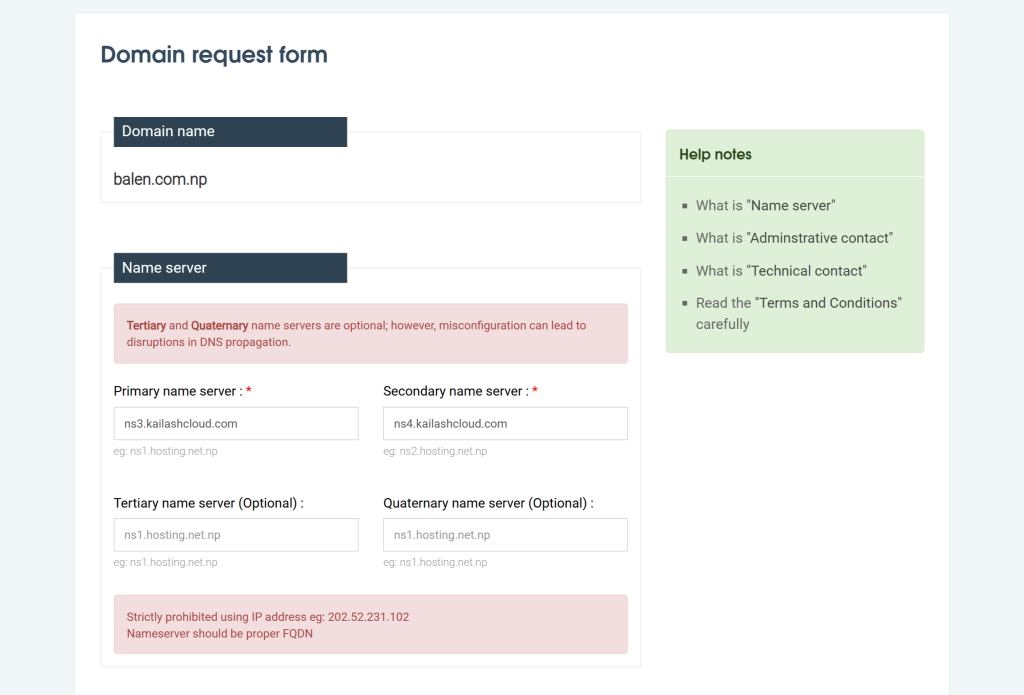
After logging in, search for your domain name again and select it. The registration form will open. Fill in each section carefully:
1. Nameserver Information
- Primary Nameserver
- Secondary Nameserver
- Tertiary Nameserver (optional)
- Quaternary Nameserver (optional)
These nameservers are usually provided by your hosting provider. If you already purchased hosting, copy the nameservers exactly as provided.
If you do not have hosting yet, you can temporarily use placeholder nameservers such as:
ns1.hosting.net.npns2.hosting.net.np
You can change the nameservers later after buying hosting.
2. Administrative Contact
Enter the details of the domain owner or responsible person:
- Full Name
- Organization Name (if applicable)
- Country
- Province/State
- City
- Address
- Email Address
- Phone Number
3. Technical Contact
Usually the same as the administrative contact unless another person manages the website technically. Fill in the same type of details.
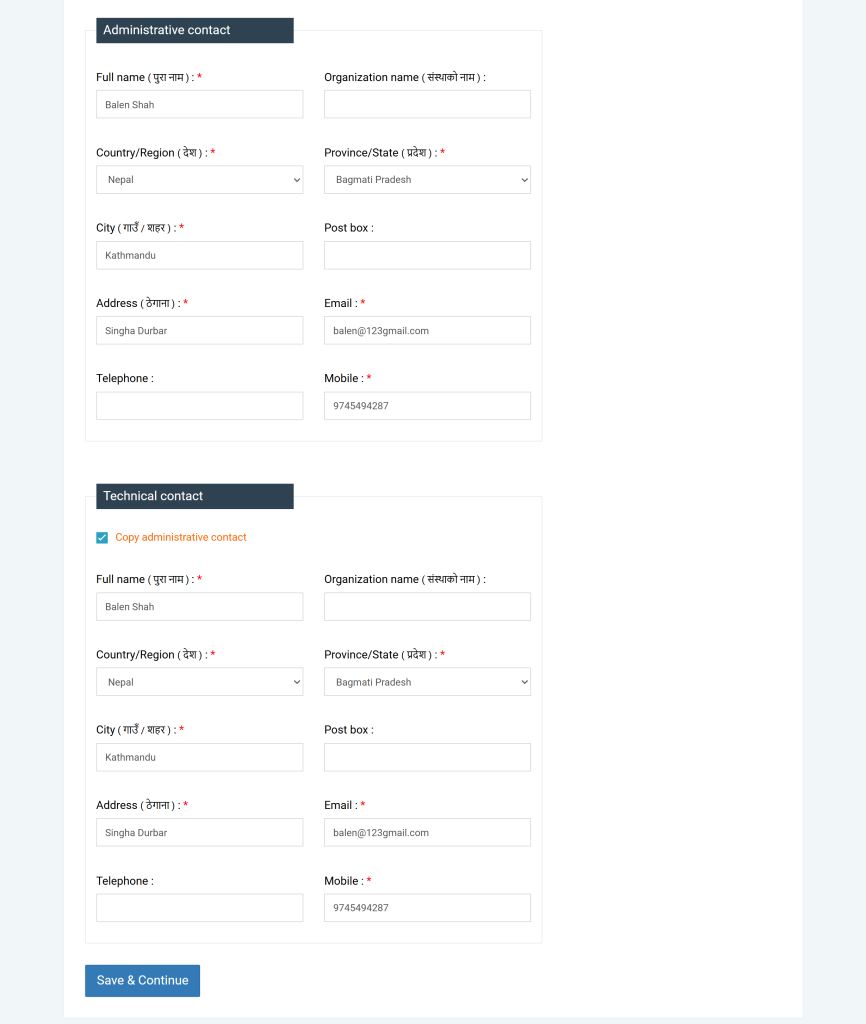
Any mismatch between your form details and your documents is the second most common reason for rejection. Double-check your spelling before you submit.
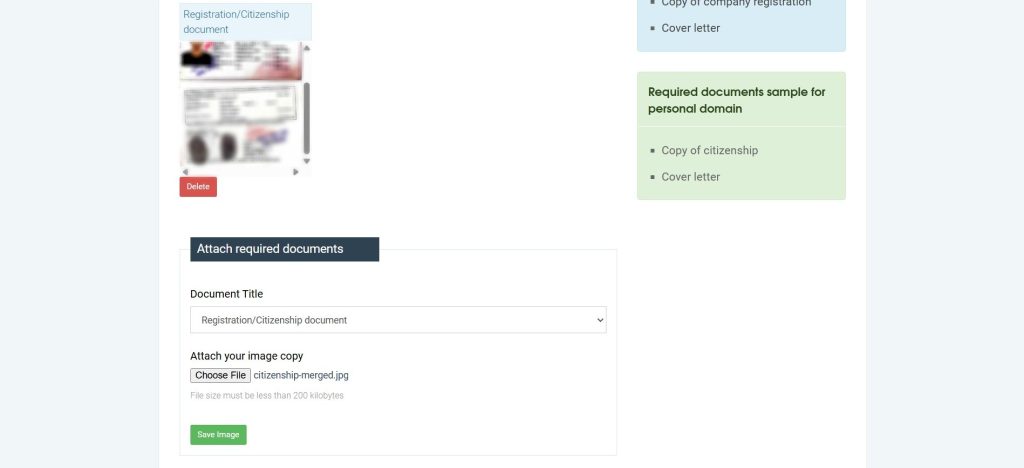
Step 4: Upload Your Registration/Citizenship Document
Upload the required documents based on your applicant type.
Check three things before uploading:
- File format is PDF or JPEG
- File size is under 200 KB
- The scan is sharp and all text is readable
Select “Registration/Citizenship” as the Document Title, then upload your image. After the upload is complete, click “Save Image” to store it successfully.
Step 5: Write a Cover Letter
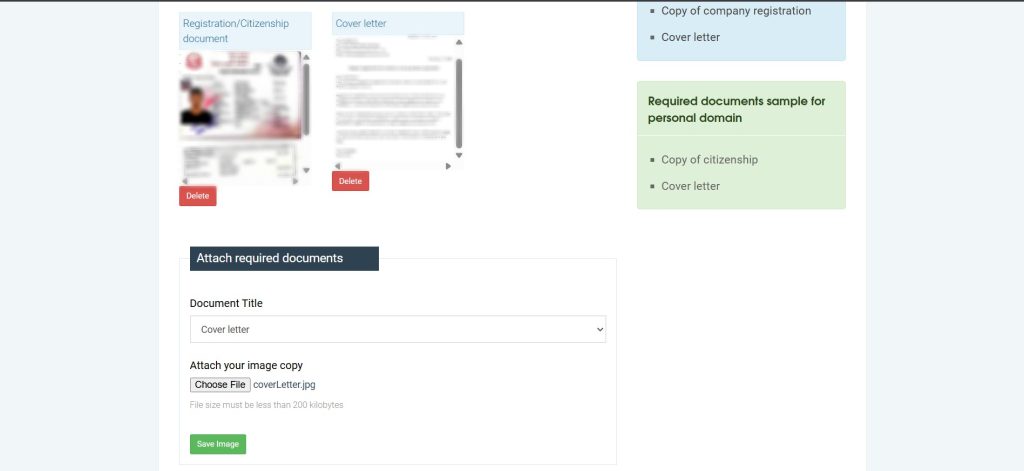
Applications require a short cover letter. Write it on plain paper or company letterhead, addressed to the .np registrar. You can also generate a cover letter from here. Include:
- Your name or organization name
- The domain name you are applying for
- Why you need the domain
- Your Email and contact number
Scan it and save as a PDF or JPEG.
Select “Cover letter” as the Document Title, then upload your image. After the upload is complete, click “Save Image” to store it successfully.
Step 6: Submit and Wait for Approval
Click “Request domain/Proceed” when everything is filled in and uploaded. A confirmation email will arrive shortly. The registry team reviews applications within 1 to 3 working days.
If something goes wrong such as the document being unclear or the name not matching your records the registry will send you an email explaining what needs to be corrected. Make the required changes then resubmit your application.
Once your submission is approved your domain will be activated and ready to use for as long as it remains renewed and active
Your .com.np domain costs nothing to register and nothing to renew. This makes it one of the most affordable ways to establish a web presence in Nepal.
Part 2: How to Register a .com, .net, or Other Domain Through Kailash Cloud
For .com, .net, .org, or any other international extension, Kailash Cloud handles the registration for you. No documents needed, no waiting days for approval. Pay using eSewa, Khalti, or bank transfer, and your domain is active within minutes.
- .com domains starting from Rs. 1,800/year
- Local payment — eSewa or bank transfer
- Support available 24/7 via WhatsApp
- Domain live within minutes of payment confirmation
- Option to add hosting in the same order
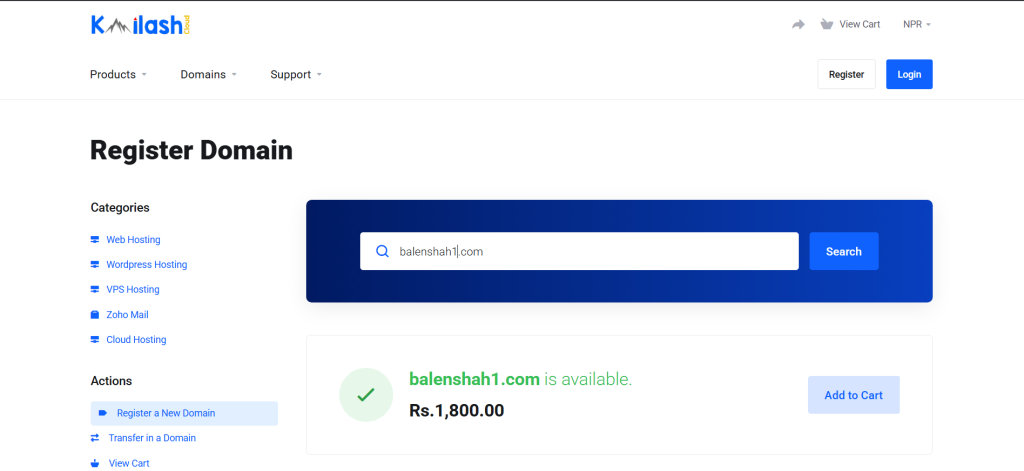
Step 1: Search for Your Domain Name
Go to kailashcloud.com/domains and type your preferred domain name with extension into the search bar.
A few things worth keeping in mind when picking a name:
- Short names are easier to remember and share, aim for under 15 characters
- Avoid hyphens and numbers if possible
- Match it to your business name so people can find you easily
Step 2: Place Your Order
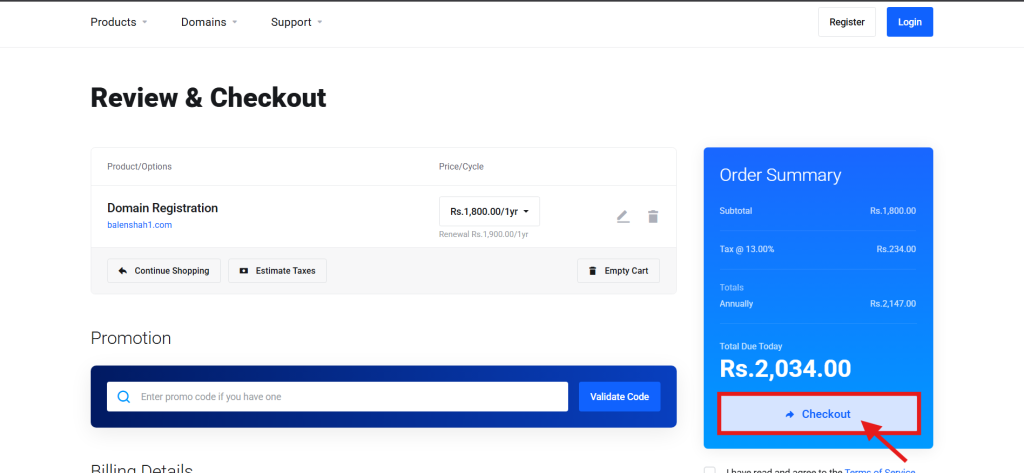
Select the domain and add it to your cart. If you also need hosting you can add a web hosting plan at the same step. Review the order carefully including the domain name extension price and registration period then proceed to continue.
Create an account on Kailash Cloud then proceed to checkout.
Ordering domain and hosting together means Kailash Cloud connects everything for you automatically. You do not have to configure DNS settings yourself.
Step 3: Make Your Payment
Transfer the amount using whichever method works best for you:
- eSewa
- Bank Transfer
Step 4: Domain Confirmed and Active
As soon as your payment is confirmed, the team processes your order and your domain goes live usually within a few minutes. You will receive a confirmation email, and you can also check your domain status by logging into the client portal.
From the portal, you can manage DNS records, renew your domain, and connect it to your website whenever you are ready.
.com.np vs .com Domain Which One Should You Register?
Both are good options depending on what your website is for. Here is a quick comparison to help you decide:
| .com.np | .com / .net / .org | |
|---|---|---|
| Cost | Free — no renewal fee ever | 1,800/yr – 3,000/yr |
| Who can apply | Nepali citizens and registered businesses | Anyone |
| Where to register | register.com.np (government registry) | Kailash Cloud |
| Documents needed | Yes | None |
| Processing time | 1 to 3 working days | Within minutes |
| Best suited for | Nepali businesses targeting local customers | Businesses targeting a wider or global audience |
| Payment | free | Wallet or Bank Transfer |
Frequently Asked Questions
Can I choose any name for my .com.np domain?
No, The domain name must match your personal name or your registered company or organization name as shown in your official documents. The registry will reject names that do not match.
Can I change my Domain name after registeration?
No once a domain is registered it cannot be changed. You would need to register a new domain name if you want a different one.
How long does .com.np registration take in Nepal?
Most applications are approved within 1 to 3 working days. Applications with clear documents are usually processed faster.
Can I transfer a .com.np domain to a different registrar?
No. According to register.com.np rules, .com.np domains cannot be transferred between registrars. They stay permanently with the registrar where they were first created.
What do I do after my domain is registered?
You need to connect your domain to a web hosting account by updating the nameserver provided by your hosting provider. So, your website can go live.
Can I register more than one domain?
Yes you can register more than one domain but the rules depend on the domain type.
For .com.np each application is strictly tied to a unique identity so one person or organization can register only one .com.np domain using their name and documents.
For .com and other extensions there is no such limitation You can register as many domains as you need depending on your requirements
Conclusion:
Domain registration in Nepal takes one of two paths. The free .com.np route requires documents and takes a few days for approval, but costs you nothing long term. The .com or .net route takes minutes, requires no documents, and runs on local payment methods most Nepalis already use.
Pick the option that fits your situation and register your domain name today before someone else takes it.